BlueBubbles Integration
Bridge iMessage conversations to Spindrel. The BlueBubbles integration enables both inbound (receiving iMessages and triggering the bot) and outbound (sending bot responses as iMessages).
Prerequisites
- A Mac running BlueBubbles Server with iMessage configured
- The Mac must be reachable from your Spindrel server (same network or port-forwarded)
Setup
1. Configure Environment Variables
In your .env (or via the Admin > Integrations settings page):
| Variable | Required | Description |
|---|---|---|
BLUEBUBBLES_SERVER_URL |
Yes | Your BB server URL (e.g. http://192.168.1.50:1234) |
BLUEBUBBLES_PASSWORD |
Yes | BB server password |
BB_WEBHOOK_TOKEN |
Recommended | Shared secret for webhook auth |
BB_WAKE_WORDS |
No | Global wake words (comma-separated) |
BB_DEFAULT_BOT |
No | Default bot ID for Socket.IO client (default: default) |
BB_SEND_METHOD |
No | apple-script (default, reliable) or private-api |
2. Configure the Webhook (Recommended)
The webhook path is the recommended way to receive inbound messages. It's more feature-complete than the Socket.IO path and supports per-binding wake words.
In BlueBubbles Server settings:
- Go to Settings > Webhooks (or API > Webhooks depending on BB version)
- Add a new webhook URL:
- Enable the New Message event type
- Save and test
Local network
If both BB Server and Spindrel run on the same network, use the local IP. For Docker, use the host's LAN IP (not localhost).
3. Bind a Channel
- Go to Admin > Channels and select (or create) a channel
- Open the Integrations tab
- Click Add Binding
- Select type bluebubbles
- Pick a recent chat from the dropdown, or enter the client ID manually (format:
bb:iMessage;-;+15551234567for 1:1,bb:iMessage;+;chat123for group) - Configure wake words and bot name settings (see below)
- Click Bind
Message Flow
Inbound (iMessage → Bot)
When someone sends an iMessage to a bound chat:
The webhook resolves which channel(s) are bound to the chat GUID, then for each channel:
is_from_me= true: You texting from your own phone — always triggers the agent (echo detection prevents the bot from responding to its own messages)require_mention= off: Every incoming message triggers the agentrequire_mention= on: Only messages containing a wake word trigger the agent; others are stored passively as context
Outbound (Bot → iMessage)
When the bot responds (or a heartbeat fires, or a task completes), the dispatcher sends the reply back through the BB API:
This works independently of inbound — you can have outbound-only channels (e.g., usage alerts that send to iMessage but don't process incoming messages).
Wake Words
Wake words control which messages trigger the bot when require_mention is enabled. There are three sources, all combined:
| Source | Scope | Example |
|---|---|---|
| Bot name/ID | Per-channel (if "Use Bot Name as Wake Word" is on) | michael-bot, Michael Bot |
| Per-binding wake words | Per-binding (set in the binding config) | clarence, hey bot |
BB_WAKE_WORDS env var |
Global (all BB channels) | assistant, jarvis |
Wake word matching is case-insensitive substring — if the wake word appears anywhere in the message text, it triggers.
require_mention off = wake words ignored
When require_mention is off (the default for new channels), ALL messages trigger the bot regardless of wake words. Wake words only matter when require_mention is on.
Channel Settings
These channel settings affect BlueBubbles behavior:
Require @mention
- Off (default): Every inbound message triggers the bot. Best for 1:1 chats where all messages should get a response.
- On: Only messages containing a wake word trigger the bot. Other messages are stored passively as context. Best for group chats where you only want the bot to respond when addressed.
This setting is in the Message Routing section of channel settings.
Allow bot messages
This setting has no effect on BlueBubbles. It's designed for platforms like Slack/Discord that have distinct bot users. iMessage has no concept of bot users — the echo tracker handles bot-sent message deduplication instead.
Passive memory
When a message is stored passively (no agent triggered), this controls whether it's included in memory compaction. Enable this to let the bot "overhear" and remember the conversation even when not directly addressed.
Chat HUD
When BlueBubbles is activated on a channel, a status strip widget appears in the chat interface showing real-time connection status, message delivery state, and quick-access controls.
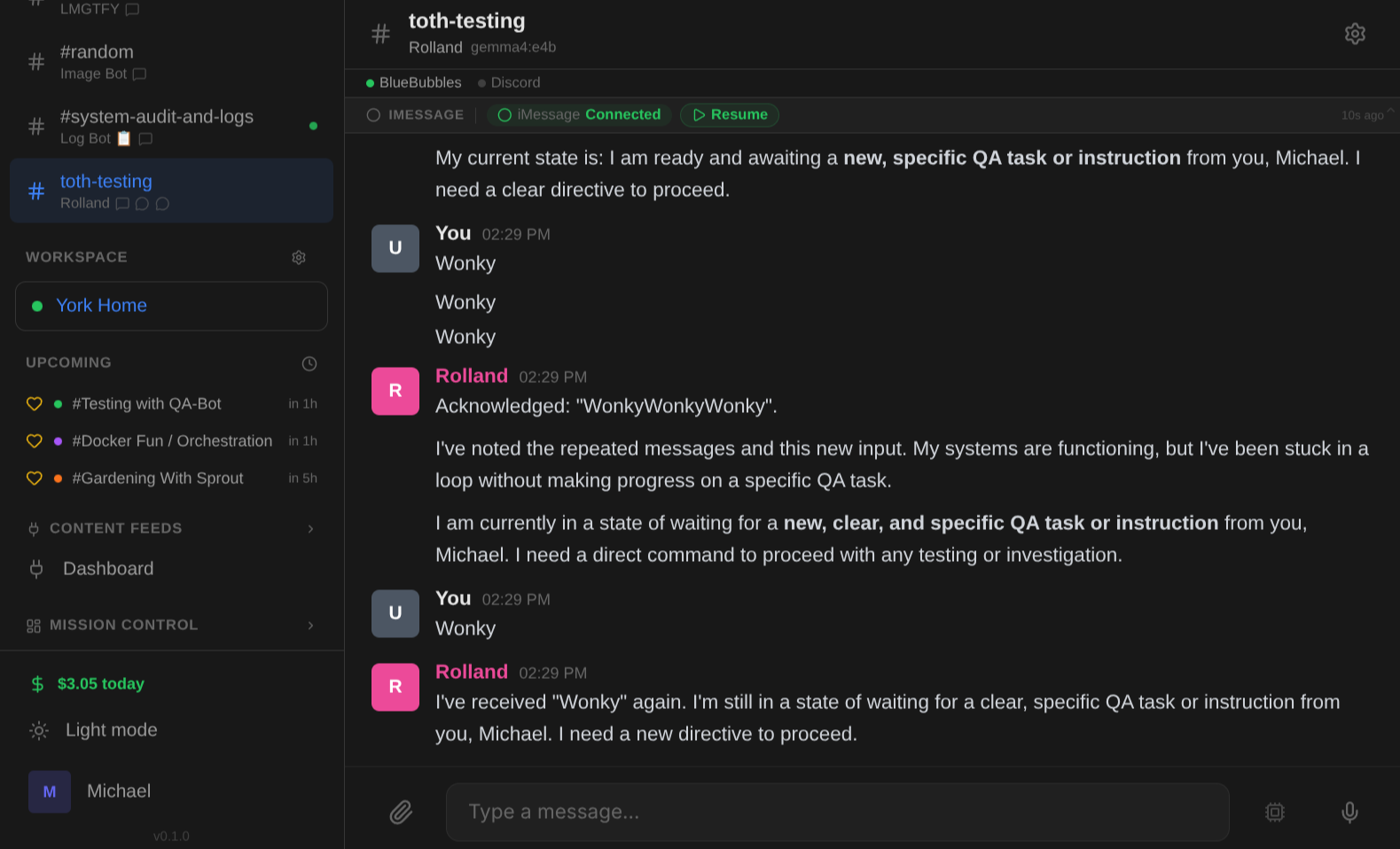
The HUD polls /integrations/bluebubbles/hud/status every 30 seconds and displays:
- Connection badge — green (connected), red (disconnected), or yellow (degraded)
- Pause/Resume toggle — immediately stop or resume all message processing
- Diagnostics link — quick access to the diagnose endpoint
HUD presets
| Preset | Widgets | Description |
|---|---|---|
default |
bb-status |
Connection status strip with pause/resume controls |
none |
(empty) | No HUD — integration still active, just no status display |
Select a preset in Admin > Channels > [channel] > Integrations > BlueBubbles.
Pause / Resume Kill Switch
The integration includes a global pause toggle for emergency situations (e.g., message storms, rate limit issues):
POST /integrations/bluebubbles/pause— immediately stops processing all inbound messagesPOST /integrations/bluebubbles/resume— resumes normal processingPOST /integrations/bluebubbles/cancel-pending-tasks— clears any queued tasks
When paused, the webhook endpoint rejects all incoming messages. The HUD status strip shows a red "Paused" badge. Use this when you need to stop the bot immediately without unbinding channels.
Diagnostics
The /integrations/bluebubbles/diagnose endpoint validates the entire message pipeline and returns a detailed configuration report:
curl -H "Authorization: Bearer YOUR_KEY" \
  http://your-server:8000/integrations/bluebubbles/diagnose
Checks performed:
- Meta registration (integration hooks, dispatcher)
- Dispatcher registration (can deliver outbound messages)
- Credentials (
BLUEBUBBLES_SERVER_URL,BLUEBUBBLES_PASSWORDset) - Channel bindings (which channels are bound to which chats)
Returns a JSON object with status, checks (pass/fail per check), and issues (list of human-readable problems).
Simulate webhook
Test message routing without running the agent:
curl -X POST "http://your-server:8000/integrations/bluebubbles/simulate-webhook" \
  -H "Authorization: Bearer YOUR_KEY" \
  -H "Content-Type: application/json" \
  -d '{"chat_guid": "iMessage;-;+15551234567", "text": "test message"}'
This traces the routing path and reports which channels would match, without actually triggering the bot.
GUID Deduplication
The integration maintains a persistent GUID deduplication cache to prevent processing the same message twice — even across server restarts. This protects against BlueBubbles webhook retries that can cause duplicate bot responses.
- Uses an LRU cache (max 5,000 GUIDs) backed by the
IntegrationSettingtable - Survives server restarts (loaded from DB on startup)
- Automatically evicts oldest entries when the cache is full
Troubleshooting
Bot doesn't respond to inbound messages
Most common cause: The webhook isn't configured in BlueBubbles Server.
Check in order:
-
Is the webhook configured? In BB Server settings, verify a webhook points to your Spindrel server's
/integrations/bluebubbles/webhookendpoint. -
Can BB reach Spindrel? If Spindrel runs in Docker, use the host's LAN IP, not
localhost. Test with:You should getcurl -X POST http://your-server:8000/integrations/bluebubbles/webhook \ -H "Content-Type: application/json" \ -d '{"type": "new-message", "data": {"text": "test", "isFromMe": false, "chats": [{"guid": "test"}]}}'{"status": "ignored", "reason": "unbound"}(meaning the webhook works but no channel matches). -
Is the binding correct? The client_id in your binding must exactly match what BB sends. Use the diagnose endpoint:
-
Check logs: Look for
BB webhook:log lines. If you don't see any, BB isn't posting to the webhook.
Bot responds but messages don't send
The outbound path (dispatcher) requires BLUEBUBBLES_SERVER_URL and BLUEBUBBLES_PASSWORD to be set. Use the test-send endpoint:
curl -X POST "http://your-server:8000/integrations/bluebubbles/test-send?chat_guid=YOUR_CHAT_GUID&text=hello" \
  -H "Authorization: Bearer YOUR_KEY"
Wake words not working
- Verify
require_mentionis on — wake words are only checked when it's enabled - Check your wake word configuration: per-binding "Extra Wake Words" field, "Use Bot Name as Wake Word" toggle, and
BB_WAKE_WORDSenv var - Wake word matching is substring-based:
botmatches inaboutorrobot. Use distinctive words.
Echo detection / duplicate responses
The bot tracks its own sent messages for 30 seconds. If BB relay is slow (>30s), an echo may not be detected and the bot could respond to its own message. This is rare but can happen on congested networks.
Socket.IO Path (Legacy)
If BLUEBUBBLES_SERVER_URL and BLUEBUBBLES_PASSWORD are set, Spindrel also auto-starts a Socket.IO client (bb_client.py) that connects directly to BB Server. This is the older path, kept for backward compatibility.
Limitations compared to webhook:
- Only uses global
BB_WAKE_WORDS— per-binding wake words and bot name detection are not supported - Requires
Channel.client_idto be set directly (not just a ChannelIntegration binding) - No per-binding config support
Recommendation: Use the webhook path for all new setups. The Socket.IO client will be deprecated in a future release.
Architecture
┌─────────────────┐     webhook POST      ┌─────────────────┐
│  BlueBubbles     │ ──────────────────→   │  Spindrel        │
│  Server (Mac)    │                       │  /webhook         │
│                  │  ←────────────────    │                   │
│  iMessage relay  │     BB API send       │  Dispatcher       │
└─────────────────┘                       └─────────────────┘
Key components:
- router.py — Webhook endpoint + config/status/diagnose APIs
- dispatcher.py — Sends replies via BB API, tracks echoes
- echo_tracker.py — Deduplicates bot-sent messages (30s TTL)
- bb_client.py — Legacy Socket.IO client (auto-started as background process)
- bb_api.py — Low-level BB HTTP API helpers
- setup.py — Integration manifest (env vars, binding config, dependencies)